
Download Zamzar – Online File Converter for PDF, JPG, MP4, DOCX, EPUB & More
Overview
Zamzar is a web-based file conversion tool designed to simplify the process of transforming documents, images, videos, audio files, eBooks, CAD drawings, and archives into hundreds of different formats. It serves as a reliable solution for users who encounter files they cannot open or view due to format incompatibility. Whether you're a student, professional, content creator, or casual user, Zamzar helps bridge the gap between file types by enabling seamless format transitions without requiring any software installation.
The platform supports over 1,100 file formats across multiple categories, including common document types like PDF, DOCX, and PAGES; image formats such as JPG, PNG, GIF, TIFF, and SVG; video formats including MP4, AVI, MOV, and WMV; audio formats like MP3, WAV, and FLAC; eBook formats such as EPUB, MOBI, and AZW; CAD files like DWG and DXF; and archive formats including ZIP, RAR, and 7Z. This broad compatibility makes it suitable for diverse real-world scenarios, from converting a client’s proprietary document to a universally readable PDF, to transforming a legacy image file for use in a modern design workflow.
Since its launch in 2006, Zamzar has processed millions of file conversions, earning a reputation for reliability and consistent performance. The developer has not provided additional details about the company’s structure or technical infrastructure. However, the platform’s longevity and widespread use suggest a mature, well-maintained service. Users can access Zamzar through any modern web browser on Windows, Mac, Linux, or mobile devices, making it highly accessible regardless of operating system.
Key Features & Capabilities
- Multi-Format Support – Convert files across 1100+ formats, including documents, images, videos, audio, eBooks, CAD, and archives, ensuring compatibility with nearly any file type encountered.
- Browser-Based Access – No software download required. Users can convert files directly from any web browser, eliminating installation steps and reducing system overhead.
- Fast Conversion Speeds – The platform aims to complete conversions within 10 minutes, offering efficient processing for time-sensitive tasks.
- High Conversion Success Rate – With years of operation and a dedicated engineering team, Zamzar maintains a strong track record in handling complex or obscure file formats.
- Customer Support & Format Requests – Users can contact the team if a desired format is not supported, and the engineering team may add it upon request.
- Future-Proofing – The service regularly adds support for emerging file formats, helping users stay ahead of evolving digital standards.
These features are particularly useful in practical workflows. For example, a researcher can convert a legacy .PUB file into a modern .DOCX format for editing, while a designer might transform a high-resolution .PSD file into a compressed .JPG for web use. Similarly, a podcast producer could convert a raw .WAV recording into a compact .MP3 for distribution. The ability to convert between formats without installing software makes Zamzar ideal for temporary or shared computing environments, such as library terminals or public workstations.
User Interface, Workflow & Performance
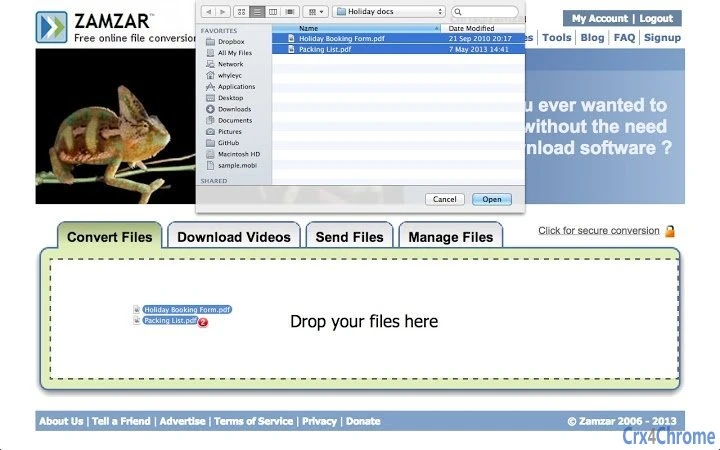
Zamzar features a clean, minimalist interface that prioritizes usability and speed. The main page displays a simple drag-and-drop zone or file selection button, followed by a dropdown menu to choose the target format. Users can select multiple files at once and convert them in bulk, streamlining workflows that involve large numbers of files.
Navigating the platform is intuitive. After uploading, users choose the desired output format from a categorized list, and the conversion begins automatically. Progress is displayed in real time, and the converted files are delivered via email or downloaded directly once processing is complete. The workflow is efficient and requires minimal user input, making it accessible even to non-technical individuals.
Performance observations are based on general software behavior patterns. The developer did not specify resource usage details, and exact performance metrics were not provided. However, as a web-based application, Zamzar relies on remote servers for processing, which means local CPU and RAM usage remains low.
This allows users to continue working on other tasks without interruption. Stability is maintained through server-side processing, reducing the risk of crashes or system conflicts. The platform is designed to handle large files and high volumes of conversions, though actual processing times may vary depending on file size and complexity.
Compatibility & System Requirements
Zamzar is accessible on all major operating systems, including Windows, Mac, and Linux, as well as through web browsers on mobile devices. The platform operates entirely in the cloud, so no local installation is required. This makes it compatible with virtually any device that has internet access and a modern browser.
Exact system requirements were not listed. The developer did not provide additional details about hardware or software prerequisites. Since the tool runs entirely in the browser, users do not need to meet specific system specifications beyond having a stable internet connection and a supported web browser. The platform is designed to function across different screen sizes and resolutions, ensuring a consistent experience on desktops, laptops, tablets, and smartphones.
Pros and Cons
Pros
- Supports over 1,100 file formats across multiple categories
- Zero installation required – works directly in the browser
- Fast conversion speeds with a target of under 10 minutes
- Accessible from any device with a web browser
- Free to use with no hidden fees
- Offers customer support and format request functionality
- Regularly updates to include new and emerging file formats
Cons
- No desktop application available – limited to web-based use
- Dependent on internet connectivity for all operations
- File size limits may apply (not specified)
- Privacy concerns may arise when uploading sensitive files
- Conversion speed may vary based on file size and server load
FAQ Section
Is Zamzar safe to use?
Yes, Zamzar is designed with security in mind. Files are processed on secure servers and are automatically deleted after conversion. However, users should exercise caution when uploading confidential or sensitive data.
Can I use Zamzar offline?
No, Zamzar requires an active internet connection to function. It is a cloud-based service and does not offer offline capabilities.
Does Zamzar support batch conversion?
Yes, users can upload multiple files at once and convert them to the same or different formats in a single session.
How long does a file conversion take?
Conversions are typically completed in under 10 minutes. Processing time may vary depending on file size, format complexity, and server load.
Is there a limit on file size?
While the developer did not specify exact limits, large files may take longer to process. It is recommended to check the platform’s current guidelines for size restrictions.
Final Thoughts + CTA
Zamzar stands out as a versatile, user-friendly online file converter with broad format support and a proven track record. Its browser-based design eliminates installation hassles and ensures accessibility across platforms. While it lacks a desktop app and relies on internet connectivity, its speed, convenience, and extensive format library make it a top choice for anyone needing to convert files quickly and reliably.
Whether you're converting a document to PDF, transforming a video for social media, or turning a CAD drawing into a shareable image, Zamzar delivers consistent results without requiring technical expertise. It’s particularly valuable for users who need occasional conversion tools without the overhead of installing software.
For those seeking a free, fast, and reliable way to handle file format challenges, Zamzar is an excellent solution. Download Zamzar now and experience seamless file conversion across all your devices.







